This blog was created for my final project for EDCI 567: Contemplating a Mindset for Educational Technology. In this blog, I will be giving a reflection based on what I have learned and offering suggestions for different classroom applications. This class has opened my eyes to many different applications and standards that will help me effectively use technology to teach my high school Spanish classes. I hope that you will find this information useful. Please feel free to share your thoughts in the comments, and share with your colleagues.
Category: Uncategorized
Web Literacy
As technology advances and new technological tools are created for our classrooms, it is important that students can effectively participate in the digital world. According to Web Literacy 2.0, “knowing how to read, write and participate in the digital world has become the 4th basic foundational skill next to the three Rs – reading, writing and arithmetic.” (Chung. A., Gill I.B., & O’Byrne, n.d.). By being able to read, write and post online students develop an understanding of the importance of having meaningful engagement online. The impact of having web-literate students could also provide a more powerful learning experience in our classrooms.
One misconception I had, was that being web literate only meant you knew how to code websites. Being web literate is much more than that. Students who are web literate can distinguish what information is the most reliable, be able to interact with people online, are aware of how their posts online could affect themselves and others and are able to create and share their own ideas online (Lawrence, n.d.)
How do we go about making our students more web literate? Mozilla (n.d.) has created several lesson plans and tool to aid teachers in implementing various activities and lessons to help promote web literacy. On Mozilla’s (n.d.) site, teachers can click a topic and see lessons created to help teach web literacy. These lessons range from beginners to advanced students and can be modified to fit the needs of the students and teacher. There are more tasks and lessons to discover on the left sidebar under “teaching activities”.
Suggestions for implementation:
One set of lesson plans that I felt was the most beneficial comes from this section of the Mozilla (n.d.) site. Teachers can peruse the lessons and incorporate many different topics like how to discern what information is the most important and create educated opinions about what they read. It is important for students to be web literate to maximize their ability to be productive online participants.
Want to know more? Check out this brief explanation created with PowToon:
YouTube Video – Web Literacy Introduction (Azzaro, 2016)

Photo by Pixabay on Pexels.com

Photo by Negative Space on Pexels.com

Photo by Lorenzo Cafaro on Pexels.com
References:
Azzaro, S. (2016). Web literacy introduction. [Video]. Retrieved from: https://www.youtube.com/watch?v=g-8HAnYNE_8
Chung. A., Gill I.B., & O’Byrne. I. (n.d.) Web literacy 2.0. Retrieved from: https://mozilla.github.io/content/web-lit-whitepaper/
Lawrence. C. (2017). A definition of web literacy (And how students can benefit). Retrieved from: https://www.teachthought.com/technology/a-definition-of-web-literacy-and-how-students-can-benefit/
Mozilla. (n.d.). Web literacy. Retrieved from https://teach.mozilla.org/teach-like-mozilla/webliteracy/
Digital Citizenship
While online (in school, or out of school), it is important that our students are responsible digital citizens. Digital citizenship is the self-monitored habits that improve one’s digital communities (Heick, 2018). Students need to not only be able to understand the possible dangers that are online but also be aware of the repercussions that their actions may have. Many students do not realize that everything that they post adds to their digital footprint online. Even if it is deleted it will remain online forever (Roush, T, personal communication, September 27, 2018).
I created a visual to help students think about being a good digital citizen using PiktoChart.

Ensuring that students are safe online is only a small portion of what it is to be an effective online citizen. Students need to be aware of their online actions, and how to effectively communicate with others. Students also need to be aware of how to distinguish if online material is reputable and how their digital footprint could affect their futures, like getting into a college or finding a job. It is important to for educators to model good digital citizenship skills in the classroom, and out in the world.
Suggestion for classroom implementation:
One problem at my school with students and their own personal technology is that students do not realize that once they post something online, it is there forever. One example to help give students an idea of how their posts are online, even after they are deleted, is to have your students firmly write their name on a sheet of paper and erase it. Have your students look to see if there is any trace of their name still on the paper (indentations, marks, etc.). Explain to students that this is like their digital footprint. Explain what a digital footprint is and guide the students through a discussion to see why they should be careful of what they post online.
Other resources:
For other great ideas and lessons on how to keep your students aware of their actions online visit Common Sense Media’s (n.d.) webpage. They offer different activities and lessons for each grade level to help students become better digital citizens. These lessons are designed to help students become critical thinkers and help students engage online communities better.
You can find another great resource about digital citizenship here, created by Google (n,d,).
References:
Common Sense Media. (n.d.). Common sense education on E-rate and CIPA: Toolkit for teachers. Retrieved from: https://www.commonsense.org/education/erate-teachers
Google. (n.d.) Be internet awesome!. Retrieved from: https://beinternetawesome.withgoogle.com/en
Heick, T. (2018). The definition of digital citizenship. Retrieved from: https://www.teachthought.com/the-future-of-learning/the-definition-of-digital-citzenship/
ISTE Standards
It seems that technology is growing in leaps and bounds and many teachers want to use new technology simply to catch their students’ attention. However, it is important to have a goal when using technology in our classrooms. Using technology should not be focused solely on raising students’ test scores or interests, however, it should be focused on preparing students for technological use to better their lives and improve learning (ISTE, 2015). The implementation of technology was seen as an opportunity to help our students flourish in a newly technologically-driven world. Because there was little in terms of proper implementation and practice, the ISTE standards were created to helps articulate what technology integration is, and what it is not (International Standards of Technology in Education, 2015).
Not only do the ISTE standards help supports teachers and shows them how to integrate tech in class to support learning, it also sets learning goals for students, and educational leaders (International Standards of Technology in Education, 2015).
Below, I have shared an image I created that gives a brief explanation of the ISTE standards taken from the International Standards of Technology in Education’s “ISTE” (2018) website.

Check out this link for a closer look at the ISTE standards and indicators.
Application of the ISTE standards:
One example of using the ISTE standards for students could be:
Create a lesson for students to create a group media project. Have each group work in a collaborative space like Google Docs, and begin collaboration (Standards achieved: Knowledge constructor, creative communication). During this collaboration time students discuss, research and share information they find appropriate. Once students find the information they are looking for; have students create a project using the technology of their choosing to demonstrate their knowledge of the material (Standards achieved: empowered learner, Computational thinker and digital citizen). The end project could include video projects, blogs, Google Slide presentation, or any other media that would be beneficial to students’ presentation (Standards achieved: Creative communication and knowledge construction). Students could also share online in a global community to collaborate and find new information on their topic (Standard achieved: Global Communication)
In this example of using technology in the classroom, students are not only learning about the content of the class, but developing important digital skills needed to be a successful digital member of society.
References
International Standards of Technology in Education. (2015). ISTE standards: Preparing students for the digital age. [VIDEO]. Retrieved from: https://www.youtube.com/watch?v=Beb45Q4dsig
International Standards of Technology in Education. (2018). ISTE Standards. Retrieved from: https://www.iste.org/standards
RAT and SAMR Models of Technological Integration
These models help teachers reflect on how effectively they are teaching with technology and how technology is impacting students’ learning and goals. Below I explain the two models, and possible applications.
The SAMR Model
This model is a framework for teachers to assess and evaluate the technology used in class. The SAMR has four different levels divided in two different sections, transformation and enhancement.
 (Foster, 2014)
Assignments that fall under the enhancement section do not increase the students’ learning, however, using technology as a replacement may make creating an assignment more efficient (Rich Colosi Media, 2014). Assignments under the transformation section learning is transformed. When students are more engaged and involved greater learning takes place (Rich Colosi Media, 2014)
How can this be applied into the classroom? Let’s imagine that students are going to create an essay for your class. The initial assignment is to be written with pencil and paper. Below I suggest possible changes based off the SAMR model.
Example of substitution: Students use a computer to write an essay instead of using pencil and paper. The assignment remains the same, however, how the assignment is completed has changed. No functional changes occur at this level (Rich Colosi Media, 2014).
Examples of Augmentation: Students use a program like Google Documents or OneNote to complete the assignment. Students are doing the same assignment, however, the technology used offers a functional improvement, like highlighting text or a translating app. This may make the assignment more efficient, but the assignment remains the same.
Examples of Modification: Students could create an assignment on a blog like Wix or WordPress and incorporate videos, links or other media that will enhance their assignment. The assignment still could be completed by other means (pencil and paper).
Examples of Redefinition: Instead of writing the essay, students can create a video through iMovie and share it online. The assignment is transformed by the technology. Students would not be able to create something this assignment without technology. (Rich Colosi Media, 2014).
The RAT Model
This model is like the SAMR model mentioned above. The RAT model also helps educators create and assess their technology use in the classroom to determine how learning is impacted (Hughes, Thomas, & Scharber, 2013). I am unable to find a lot about the RAT model of technology integration. Which is unfortunate, because it is the model I prefer of the two.
According to Hughes (2018) the RAT model was created to assess educators’ understanding of technology’s role in education and implementation of technology and consists of three levels.
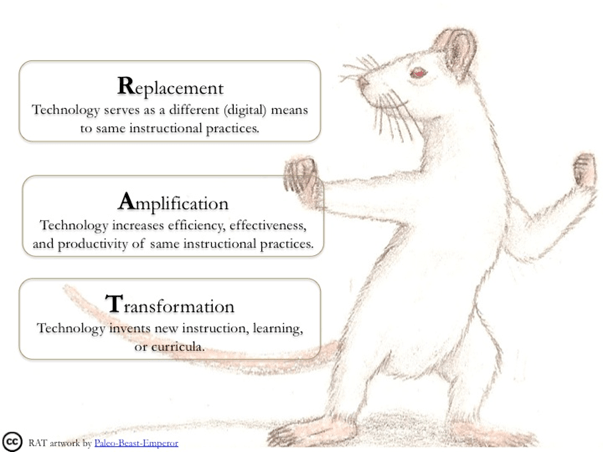
(Hughes, 2018)
Let’s think back to the example I mentioned above with the SAMR model. With original assignment students were going to create an essay using paper and pencil. Below I will give examples of how the RAT model could change/enhance the assignment.
Example of Replacement – Students use computers to type their essay instead of using the paper and pencil. “Replacement” is essentially the same as SAMR’s substitution level. Technology is used as a replacement the method of completing the assignment and offers no functional changes to the assignment.
Example of Amplification – Students use a program to create their essay and the assignment is enhanced by features offered by the technology used. This is similar to the Augmentation section of SAMR. The assignment stays the same, however, functions added by the program being used help increase efficiency, effectiveness and productivity.
Example of Transformation – Students will create a video project using iMovie instead of writing an essay. This is similar to the Redefinition level of SAMR. Technology provides new teaching, learning and curricula that was not possible before (Hughes, 2018).
Click Here for a visual I created for my EDCI 567 class of the RAT model.
Also, be sure to check out the other example, click here, I created showing the implementation of the RAT model through one of my assignments.
Summing up SAMR and RAT Models
These two models, in my opinion, are very similar to one another. I do not see one being more beneficial than the other. I do, however, prefer the RAT Model. I like information to be simple and to the point and I feel the RAT Model does that. Both seem to be very viable tools, it just depends on the users’ preference of which model to they would like to use.
References:
Foster, A. (2014). Using showbie with the SAMR model. [Image]. Retrieved from: https://www.showbie.com/using-showbie-with-the-samr-model/
Hughes, J. (2018). Replacement, amplification and transformation: The R.A.T. model #ratmodel. Retrieved from: http://techedges.org/r-a-t-model/
Hughes, J., Thomas, R., & Scharber, C. (2013, March 14). Assessing technology integration: The RAT – replacement, amplification, and transformation – framework [Slides]. Retrieved from http://www.slideshare.net/joanhughes/hughes-scharber-site2006
Rich Colosi Media. (2014). The SAMR model explained by students. [Video]. Retrieved from: https://www.youtube.com/watch?v=OBce25r8vto&feature=youtu.be
SLHSMrJerickson. (2014). SAMR elementary examples. [Video]. Retrieved from: https://www.youtube.com/watch?v=zZVUd7jZaS0
Bloom’s Digital Taxonomy
Bloom’s Digital Taxonomy was created to help educators implement technology and digital tools to enhance students’ learning and expand on skills associated with each level of the taxonomy (Sneed, 2016). Not only does this help teachers utilize technology, it also guides lesson planning, assessments and rubric making (Wantanami-Crocket, 2015). The higher the implementation of technology in class, the higher the learning students achieve (Common Sense Education, n.d.). You may notice that there are many different visuals and construction of this model. All of the models have the same information, find one that works for you and stick with it, or create your own using an online image creator like PiktoChart.
 Image created by Ron Carranza (e.g. Sneed, 2016)
Be sure to check out this blog, created by Watanabe-Crocket (2015). The author shares a great visual to help educators understand the different activities that could be utilized for each of the sections of Bloom’s Taxonomy.
This image created by Carrington (n.d.) is also a great example of the different levels of Bloom’s Digital Taxonomy. This resource actually breaks down the different levels and shares apps that will help students achieve those levels of the taxonomy. I find this model to be very beneficial. I feel that once educators have a basic idea of this model, they will be able to place apps they come across into its appropriate section.
Classroom application:
When I think of classroom application my thoughts go to the teachers that use technology for every single assignment. I have noticed that many of these teachers use technology just to use technology regardless of if it helps their students’ learning or not. I feel that the assignment should dictate the use of technology. Technology should be included to enhance and benefit learning in some way. It is important to take the assignment into consideration and then plan using Bloom’s Digital Taxonomy.
References
Carrington, A. (n.d.). The pedagogical wheel v5.0. Retrieved from https://designingoutcomes.com/assets/PadWheelV5/PW_ENG_V5.0_Android_SCREEN .pdf
Common Sense Education. (n.d.). Video library > Bloom’s digital taxonomy. Retrieved from: https://www.commonsense.org/education/videos/blooms-digital-taxonomy
Sneed, O. (2016). Integrating technology with Bloom’s taxonomy. Retrieved from: http://teachonline.asu.edu/2016/05/integrating-technology-blooms-taxonomy/
Watanabe-Crocket, L. (2015). Bloom’s digital taxonomy verbs. Retrieved from: https://globaldigitalcitizen.org/blooms-digital-taxonomy-verbs
TPACK Framework
TPACK helps teachers effectively teach with technology by providing a framework for lesson planning (Koehler, n.d.). Teachers create their lesson plans using this format to apply content, pedagogical, and technological knowledge, and the areas that they overlap.
For classroom application teachers should start with the content knowledge section of the TPACK model and focus on the content they are going to teach and then focus on the appropriate methods and technology that best benefits student learning. Teachers do not need to use the highest level of thought with every assignment. Sometimes a lower end activity is the most beneficial to a certain type of assignment (Miller, n.d.).

(Koehler, n.d.)
The TPACK Model consists of seven different sections. The three primary sections are Content Knowledge, Pedagogical Knowledge, and Technological Knowledge.
1. Content knowledge deals with the knowledge the teacher has about the subject matter to be taught (Koehler, n.d.).
2. Pedagogical Knowledge deals with the knowledge, processes and methods the teacher plans to use.
3. Technology Knowledge deals with the knowledge of technology being used.
Three other knowledge sections are created where each of the primary knowledge circles connects to another circle. The three sections are:
4. Technological Pedagogical Knowledge – deals with methods of implementing technological to create ways of teaching (Koehler, n.d.).
5. Technological content knowledge – understanding how content and technology complement each other (Koehler, n.d.).
6. Pedagogical content knowledge – knowledge of content and teaching methods to best implement instruction (Koehler, n.d.).
7. Technological Pedagogical Content Knowledge – Where all three knowledge circles converge in the center we have the Technological Pedagogical Content Knowledge. This is considered the basis of effective teaching with technology (Koehler, n.d.). This is where all of your content, pedagogy, and technological knowledge comes to create effective lessons where students learn, create and grow using technology.
Here is an example of a TPACK model (visual below) and lesson that I created for my EDCI 567 class.

With a little practice, utilizing the TPACK model will effectively enhance your teaching using technology in your classroom. I am still learning to implement this model, however, it has made a positive impact on how I determine what technology to use in my classroom.
References:
Koehler, M. (n.d.). Tpack.org. [Image]. Retrieved from http://www.tpack.org/
Miller, M. (n.d.). Rethinking SAMR, TPACK and using technology well. Retrieved from
http://ditchthattextbook.com/2014/03/13/rethinking-samr-tpack-and-using-technologywell/
 Blog Space for Concordia Classes